Private Kubernetes (CKA / CKAD) lessons with AI
Kubernetes (CKA / CKAD) with a live private lesson: the teacher talks with you out loud and explains on a shared board, moving at your pace through a clear plan, lesson after lesson.
Teacher: Noam
- Course updated 11/2026
- Hebrew, and 5 more languages
- 4 levels: Beginners · Intermediate · Advanced · Test prep
- 47 lessons · about 26 hours of lessons
Kubernetes (CKA / CKAD)
Kubernetes (CKA / CKAD) with a live private lesson: the teacher talks with you out loud and explains on a shared board, moving at your pace through a clear plan, lesson after lesson.
11 lessons · 5 modules · Live private lesson with the teacher on the board
What you'll learn
- Why Kubernetes and How a Cluster Is Built
- Pods: The Unit of Execution
- Deployments: Run, Update and Scale
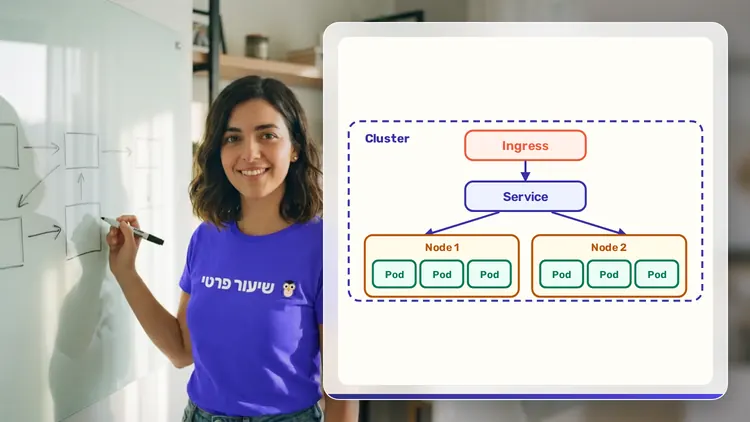
- Services and Ingress: Exposing the Application
- Capstone: End-to-End Application
- Configuration Outside the Image
- Volumes and Persistent Storage
- Workloads Beyond Deployment
- Health and Resources
- Namespaces, Access Control and Pod Security
- Packaging and Repeatable Deployment
- Advanced Scheduling
- Cluster Installation, Upgrade and Maintenance
- Cluster Networking
- Troubleshooting
- Exam Environment, Speed and Time Management
- CKAD-Style Practice
- CKA-Style Practice
- Mock Exam and Debrief
Related topics
What's included
- Live 1:1 lessons with an AI tutor on a shared board
- 26 hours of live one-on-one lessons
- 47 lessons on a shared board, each with a clear goal
- Practice and a understanding check in every lesson
- A summary after every lesson, saved in the history
- Preparation for the CKA / CKAD
- A completion certificate for each level
- Computer, tablet or phone
- Hebrew, plus 5 more languages
Course plan
4 levels · 19 modules · 47 lessons · 26 hr 10 min total
BeginnersKubernetes Beginner: From Container to a Running, Reachable Deployment5 modules • 11 lessons • 6 hr 15 min
Why Kubernetes and How a Cluster Is Built3 lessons • 1 hr 40 min
- 1From a Single Container to Orchestration: Why KubernetesTrial lessonabout 30 min
- 2Cluster Architecture: Control Plane and Worker Nodesabout 35 min
- 3kubectl and YAML: From apply to a Running Podabout 35 min
Pods: The Unit of Execution2 lessons • 1 hr 5 min
- 4Pod Anatomy: Containers, Ports and Labelsabout 30 min
- 5Pod Lifecycle and First Debuggingabout 35 min
Deployments: Run, Update and Scale2 lessons • 1 hr 10 min
- 6Labels, Selectors, ReplicaSets and Deploymentsabout 35 min
- 7Rolling Updates, Rollbacks and Scalingabout 35 min
Services and Ingress: Exposing the Application3 lessons • 1 hr 40 min
- 8ClusterIP Services and In-Cluster DNSabout 35 min
- 9NodePort and LoadBalancer: External Accessabout 30 min
- 10Ingress: HTTP Routing by Host and Pathabout 35 min
Capstone: End-to-End Application1 lesson • 40 min
- 11From YAML to a Working Site: End-to-End Deploy and Debugabout 40 min
IntermediateIntermediate: Configuration, Storage, Health and Security in Kubernetes6 modules • 12 lessons • 6 hr 35 min
Configuration Outside the Image2 lessons • 1 hr
- 1ConfigMap: Settings as Env and Filesabout 30 min
- 2Secrets: Passwords, Tokens and What base64 Doesn't Protectabout 30 min
Volumes and Persistent Storage2 lessons • 1 hr 10 min
- 3Volumes and Multi-Container Podsabout 35 min
- 4PV, PVC and StorageClass: Storage That Outlives the Podabout 35 min
Workloads Beyond Deployment2 lessons • 1 hr 5 min
- 5StatefulSet and DaemonSet: Stable Identity and a Pod per Nodeabout 35 min
- 6Jobs and CronJobs: Tasks That Finishabout 30 min
Health and Resources2 lessons • 1 hr 10 min
- 7Probes: Liveness, Readiness and Startupabout 35 min
- 8Requests, Limits, QoS and Autoscalingabout 35 min
Namespaces, Access Control and Pod Security3 lessons • 1 hr 35 min
- 9Namespaces, ResourceQuota and LimitRangeabout 30 min
- 10RBAC: Roles, RoleBindings and ClusterRolesabout 35 min
- 11ServiceAccounts and SecurityContext: Pod Identity and Hardeningabout 30 min
Packaging and Repeatable Deployment1 lesson • 35 min
- 12Helm and Kustomize: One App, Many Environmentsabout 35 min
AdvancedAdvanced (Professional): Scheduling, Cluster Operations, Networking and Troubleshooting4 modules • 12 lessons • 6 hr 35 min
Mapped to exam: CKA / CKAD
Advanced Scheduling2 lessons • 1 hr
- 1nodeSelector and Affinity: Steering Pods to Nodesabout 30 min
- 2Taints, Tolerations and PriorityClassabout 30 min
Cluster Installation, Upgrade and Maintenance4 lessons • 2 hr 10 min
- 3kubeadm: Bootstrapping a Cluster, Certificates and kubeconfigabout 35 min
- 4Cluster Upgrade and Node Maintenance: drain, cordon and PDBabout 35 min
- 5etcd Backup and Restoreabout 30 min
- 6Extending Kubernetes: CRDs, Operators and Admissionabout 30 min
Cluster Networking3 lessons • 1 hr 40 min
- 7Pod Networking Inside: CNI, kube-proxy and CoreDNSabout 35 min
- 8NetworkPolicy: A Firewall Between Podsabout 35 min
- 9Gateway API: Beyond Ingressabout 30 min
Troubleshooting3 lessons • 1 hr 45 min
- 10Application Troubleshooting: CrashLoopBackOff, OOMKilled and Pendingabout 35 min
- 11Node and Control Plane Troubleshootingabout 35 min
- 12Network Troubleshooting: Empty Endpoints, DNS and Policiesabout 35 min
Test prepCKA & CKAD Exam Preparation4 modules • 12 lessons • 6 hr 45 min
Mapped to exam: CNCF Certified Kubernetes Administrator (CKA) and Certified Kubernetes Application Developer (CKAD)
Exam Environment, Speed and Time Management3 lessons • 1 hr 25 min
- 1Exam Format, Remote Desktop and Contextsabout 25 min
- 2Fast kubectl: Imperative Commands, Dry-Run, Explainabout 35 min
- 3Time Management: Triage, Flagging and Verificationabout 25 min
CKAD-Style Practice4 lessons • 2 hr 15 min
- 4CKAD: Application Design, Build and Deploymentabout 40 min
- 5CKAD: Application Observability and Maintenanceabout 30 min
- 6CKAD: Environment, Configuration and Securityabout 35 min
- 7CKAD: Services and Networkingabout 30 min
CKA-Style Practice4 lessons • 2 hr 25 min
- 8CKA: Cluster Architecture, Installation and Configurationabout 40 min
- 9CKA: Workloads, Scheduling and Storageabout 35 min
- 10CKA: Services and Networkingabout 30 min
- 11CKA: Troubleshooting Method for 30% of the Scoreabout 40 min
Mock Exam and Debrief1 lesson • 40 min
- 12Timed Mock Exam and Debriefabout 40 min
What you need
- No prior knowledge needed for beginner level: the teacher checks what you already know and starts from there
- For higher levels: what you learned at the level before (you can skip it if you already know it)
- A computer, tablet or phone with a microphone, and a browser
Who it's for
- Adults: for work, study, an exam, or just curiosity
- For anyone preparing for CKA / CKAD
Exams and certifications
- CKA / CKAD
- Advanced: CKA / CKAD
- Test prep: CNCF Certified Kubernetes Administrator (CKA) and Certified Kubernetes Application Developer (CKAD)
More courses in this track
Your teacher
 NoamAI private tutor, in a live lesson on a shared board
A private AI teacher who teaches in a live conversation: asks, listens, draws on the board, and lets you solve it yourself with hints. Remembers what you've learned and starts each lesson where you left off.
What's a lesson like?
Your child talks with the teacher out loud, like a video call, and asks about anything unclear.
The teacher explains, writes and draws on a shared board, and your child solves along on the same board.
Snap a photo of a worksheet or homework and work through it, one problem at a time.
Parents get a report: study time, what went well and what needs more practice.
Lesson rules
- Just Learning
- Prepare, Don't Copy
FAQ
- How does a private Kubernetes (CKA / CKAD) lesson work?
- Pick Kubernetes (CKA / CKAD) and a level, then talk with the teacher out loud. The teacher asks what you already know, explains, writes and draws on the board, and lets you solve on your own with hints until it's clear.
- How long does the Kubernetes (CKA / CKAD) course take?
- 11 lessons of about 34 minutes at the first level, at your own pace. You can pause, go back, or skip what you already know.
- Do I need prior knowledge?
- Not for beginner level. At the start of the first lesson the teacher checks what you already know and adjusts the level, and you can jump straight to an advanced level.
- How do I start for free?
- Sign in with Google or a code sent to your email, enter your child's name and grade, and the lesson starts right away. Every family gets 45 free lesson minutes in any subject, counted by actual lesson time, with no credit card. Then choose a paid plan and cancel anytime.
- What device do I need?
- Any computer, tablet or phone with a browser and a microphone. You can also install the site as an app on your home screen.
Want to try it?
Sign in, enter your child's name and grade, and the lesson begins. 45 free lesson minutes, no credit card.
Start for freeShiur Prati with AI: what it is and how it works